CloudPOS
A browser-based sales workspace for your counter or connected application
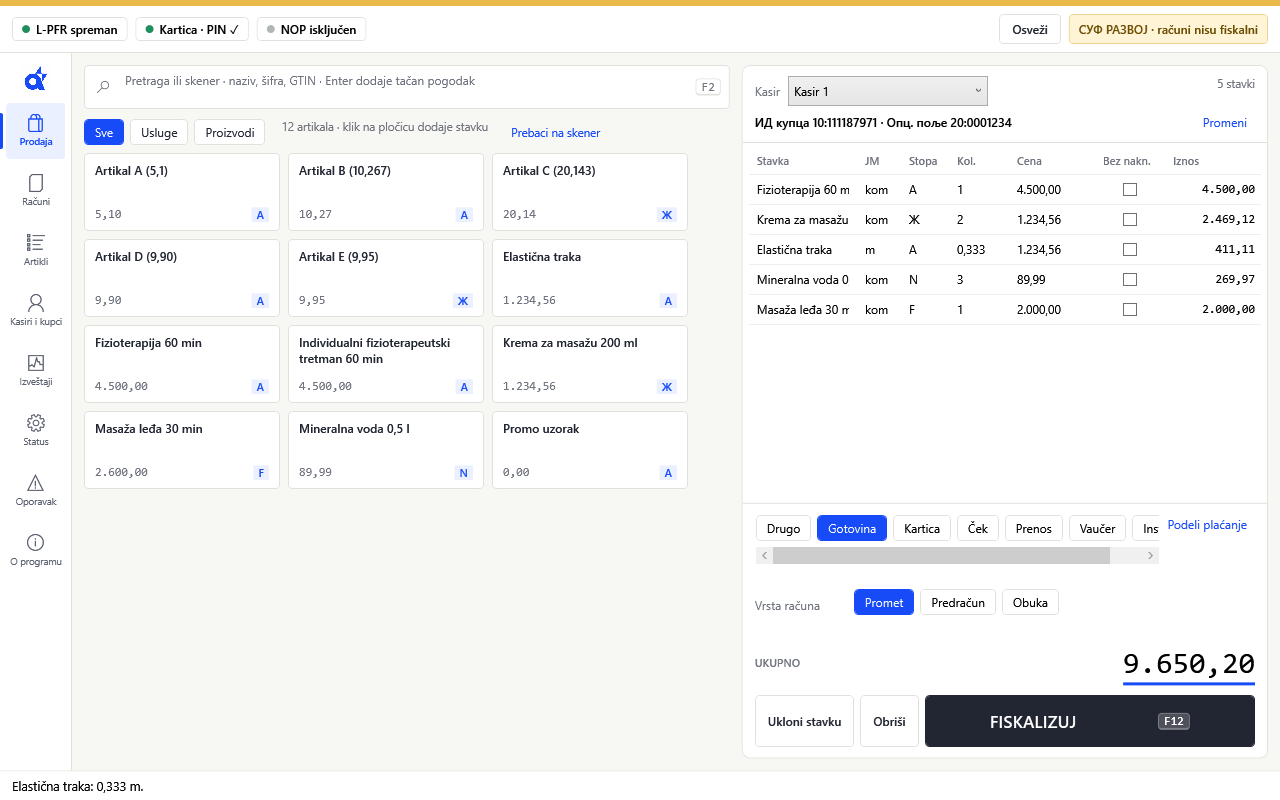
CloudPOS is an online till that signs receipts through the Tax Administration’s virtual fiscal processor (V-PFR). It runs standalone as your shop’s point of sale, or embedded in another system – an ERP, a clinic application or your own software.
What you do with it
Sell with a scanner
Scan field, match list, quantity keypad and change helper.
Issue every receipt type
Sale, proforma, training, copy and refunds, with buyer identification.
Run the office
Items, prices, customers and cashiers in one place.
Features
Scanner-first selling
Scan field, match list, quantity keypad and change helper.
Basic-class receipts
Sale, proforma, training, copy and refunds, with buyer identification against the official codebooks.
Signing through the V-PFR
One certificate per business; unclear outcomes recover without double fiscalisation.
Printing on 80 mm or A4
The same receipt renderer as the desktop ESIR.
Tax label checks
Tax labels are checked against your own PFR before every sale.
Datalab Pantheon lookup
Lookup and adoption of customers and items from Pantheon.
One till, two ways to run it
In standalone mode CloudPOS is your shop’s till: cashiers sign in with a PIN and the office screens manage items, prices, customers and cashiers.
In embedded mode the till runs inside another application. A signed callback tells the host when a receipt was fiscalised, so stock is posted exactly once.
The same fiscal core as the desktop ESIR
CloudPOS and AInspiredApps ESIR share one set of fiscal rules and one receipt layout. Unclear outcomes are recovered by request ID and never re-sent automatically.
A typical workflow
PIN sign-in
The cashier signs in with a PIN; the office maintains items and prices.
Scan and charge
Items are scanned, the payment method and receipt type are chosen.
Fiscalisation
The receipt is signed through the V-PFR and printed on 80 mm or A4.
Demo video
Integrations and deployment
Confirmed: the Tax Administration’s V-PFR (sandbox), embedded mode with a signed callback for the ERP and clinic software, Datalab Pantheon lookup. In progress: the ESIR approval application.
Setup, training and support
Setup follows the way you work: a demonstration with your own examples first, then configuration and training. Support comes directly from the people who build the software, no automated replies.
Frequently asked questions
Does CloudPOS work offline?
Can I embed it in my own software?
Let’s see if it fits your work
We will walk you through the application with your own examples and answer your questions.